Martin's HelpDesk

  • Home
  • About
  • Support
  • Services
    • Web Listings →
      • Create a Forum
      • Create a Job Listing
      • Create a Property Listing
    • IT Services →
      • IT Care Plans
      • Backup
      • Smart Phone Setup
      • ESET Security
      • Email Security
      • Job Tracking
    • Web Services →
      • Domain and Hosting
      • Web Development
      • Web Listings
      • eCommerce
  • Testimonials
  • News
  • Contact
You are here: Home / Archives for 2017

Archives for 2017

16 September, 2017 by Martin Vines Leave a Comment

Web Site Security

Starting in October 2017, Google will display the message “Not Secure” in the address bar when users interact with an un-encrypted webpage.
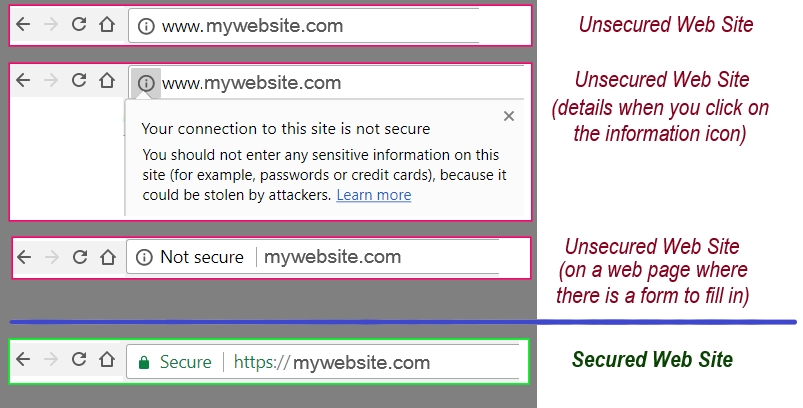
Chrome SSL Views

Google Chrome dominates the global browser market to such a great degree that more than half of the world’s internet users will see the warnings when they interact with unencrypted websites.

Don’t allow your competition to get ahead of you !

Stay ahead on Google rankings, customer trust AND show you care about security.
Have your site secured now before it’s too late…

Keep your clients and viewers happy! Keep data safe and encrypted between your web page and your client. Get your site converted to HTTPS before it’s too late.

Apply Now

Filed Under: Security

3 January, 2017 by Martin Vines Leave a Comment

CyberAttacks – How to Avoid

One answer is… – Never turn your computer on!

However, we know that that defeats the object of owning a computer, like “never drive your car to avoid an accident”.

Your car has security. A key to open it and start it, an alarm and immobilser, seatbelts, a front and rear bumper, airbags, proximity sensors etc. You would avoid driving your car into mud, thick sand or into a disreputable area.

Similar appropriate measures are necessary for a computer.

Your computer is a modern day tool for many things which includes finding information, keeping records, productivity, keeping in touch and being able to shop.

Keep your computer protected by observing the following:

  • Lock-Up. When left unattended the computer should be locked away – be it in a building, a room or a cupboard.
  • Log-In password. Use a Log-In Password/ Pin-Code to log into the computer.
    You could also add extra security and set up a password in the computer BIOS which locks the hard disk drive and requires unlocking password immediately at boot up.
  • AntiVirus. Install good (paid for) Security Software on your computer. I recommend ESET Smart Security. Windows Defender, is already included with Windows 10 computers (also Windows 7, 8 and 8.1), but it has limitations. Other security software disables this software when installed.
  • Bogus Phone calls. Anyone calling you on your phone about your computer should be rejected immediately. Unless a piece of monitoring software is already installed on your computer by someone you know, it is impossible for anyone else to detect issues with your computer.
  • Phishing. You may get emails with a web site link or you may land on a web site which requires you to provide sensitive information. NEVER fill in a form on a web site unless you have checked the web site address to one which you know and sure of.
  • Bogus animations. You may land on a web site with an animation of a scan displaying numerous virus issues. This is NOT your computer, it is simply a scaremongering animation designed to alarm you to take further action. Close the website tab or application immediately.
  • Emails with attachments. Spam email can have an attachment which contains a virus. Unless you have pre-arranged to receive that email and attachment, do not open the attachment. If you cannot verify with the sender of the email, delete it immediately.
  • Software and applications. Most viruses and hacks come in the form of software which you have been coaxed to install. This software can include: Registry cleaning, Driver maintenance, Defragging, Web Browser toolbars, bogus Security or Antivirus software, Audio and Video Codecs or Pirated software. (Pirated software is software which is a copy of the original but key generated to avoid having to enter a product unlock key. Hackers often inject virus software into these programs.)
  • PUPS (Potentially Unwanted Programs). This is software, usually free and useful, but has other software bundled into it and installs onto your computer without your permission.

Good Antivirus software will detect and ban dodgy emails, software and websites before the worst happens.

PUPS

Filed Under: Security

View All Testimonials
Had my previous mobile for 6 years, using it only for calls and texts with the occasional photo. I had only a vague idea of some of the amazing things the modern mobile is capable of. Martin advised …More on a suitable new phone for my needs. He then helped me set up security lock, owner info and emergency ‘ICE’ contacts so potentially critical information is readily available should I have an accident; installed my e-mail accounts, WhatsApp, Google Drive & Google Pay; set up cloud based default location for contacts, calendar app and photos, so they can be shared with my other devices & chosen contacts and will remain available to me should the phone be broken or lost; configured home screen to show only apps most often used and set up quick launch for the camera so it can be accessed instantly.  Calendar updates and all photos from a recent trip abroad have appeared seamlessly on my other devices. Martin is very knowledgeable about what is available in terms of both hardware and Apps and can advise on both to suit your needs. Thanks to Martin I have been delighted with my new phone and apps and am looking forward to exploring further.

— Miriam Young

Contact Us

Call 0117 911 8064
Martin's HelpDesk
26 Woodland Avenue
Kingswood
Bristol
BS15 1PZ

Recent Posts

  • FreeFileSync 2 January, 2023
  • Google Photos 29 January, 2021
  • Emergency on Huawei Phone 1 July, 2020

Follow Us On…

Follow us on FaceBook   Follow us on LinkedInFollow us on Twitter

Privacy Policy

Copyright ©Martin's HelpDesk 2018. Developed and Designed by martin's HelpDesk using the Genesis Framework and Executive Pro Theme